Independent iOS app
2026
LessLate
An iPhone app I created that checks you have actually left, not only that you stopped the alarm. A living case study, updated with each release.

Set, Today and Routines in version 1.3.0. Screens in this case study are simulator captures rebuilt from versioned source.
Overview
Leaving on time when the plan keeps changing
LessLate grew from my work in traffic management. Sites moved around the country, permit schedules set our start times, and departure times changed from day to day. Working backwards from an arrival time again and again was tiring, and I saw missed alarms delay colleagues and hold up the wider team.
That pointed me at the gap between planning to leave and actually leaving.
LessLate lets someone set a leave time, or work one out from an arrival time and destination. It sounds an alarm, then checks whether they have left their starting area and reminds them again if they have not.
Version 1.1 went live on the App Store on 17 September 2026, and 1.3.0 followed on 30 September. The journal below holds the release history.
You can also visit the LessLate website.
My role
Leading the product and an AI assisted build
LessLate is my own product. I set its direction, designed the interface, wrote the copy, decided what went into each release and tested it on my own iPhone.
I directed the AI assisted build with Codex and Claude Code, reviewed the implementation and tested the behaviour on my iPhone. Working this close to the code put design decisions up against iOS limits: permissions, location accuracy, alarm behaviour and App Store release rules. A screen could look finished while the behaviour behind it still needed work.
Brand through the experience
My graphic design background shaped the brand. The tone is supportive, a cancelled reminder ends neutrally rather than as a failure, and feedback is meant to recognise a confirmed departure.
Key decisions
A reminder is done when you have left
Confirmed departure as the completion rule
The central decision was what counts as done. In LessLate, a reminder is complete when the person has left, not when the alarm is stopped. Stopping the alarm only acknowledges it. The app keeps checking until departure is confirmed or the person cancels.
Certainty over speed
That rule needed a definition of leaving. Early tests narrowed the starting area from 150 metres to 50. Departure is confirmed only after two consecutive location readings, each accurate to 25 metres or better, beyond that boundary. I chose to wait for reliable location readings and to leave departure unconfirmed when the evidence is poor, even though that can make confirmation slower.
Device tests that changed the product
In a September device test, an alarm set for a specific time was not heard. The Lock Screen countdown was a suspected cause, though not proven. I removed it and used a Live Activity showing a fixed leave time instead, and a later device test confirmed the alarm sounding on time.
In another test, departure was not confirmed automatically after a walk beyond the boundary, although a manual retry worked. The location session was not being kept across launches. After the fix, background and force quit tests on 22 September passed.
Explain limits when they matter
The interface explains when another manual reminder is already running, and it says “Unlock Pro” because there is no free trial.
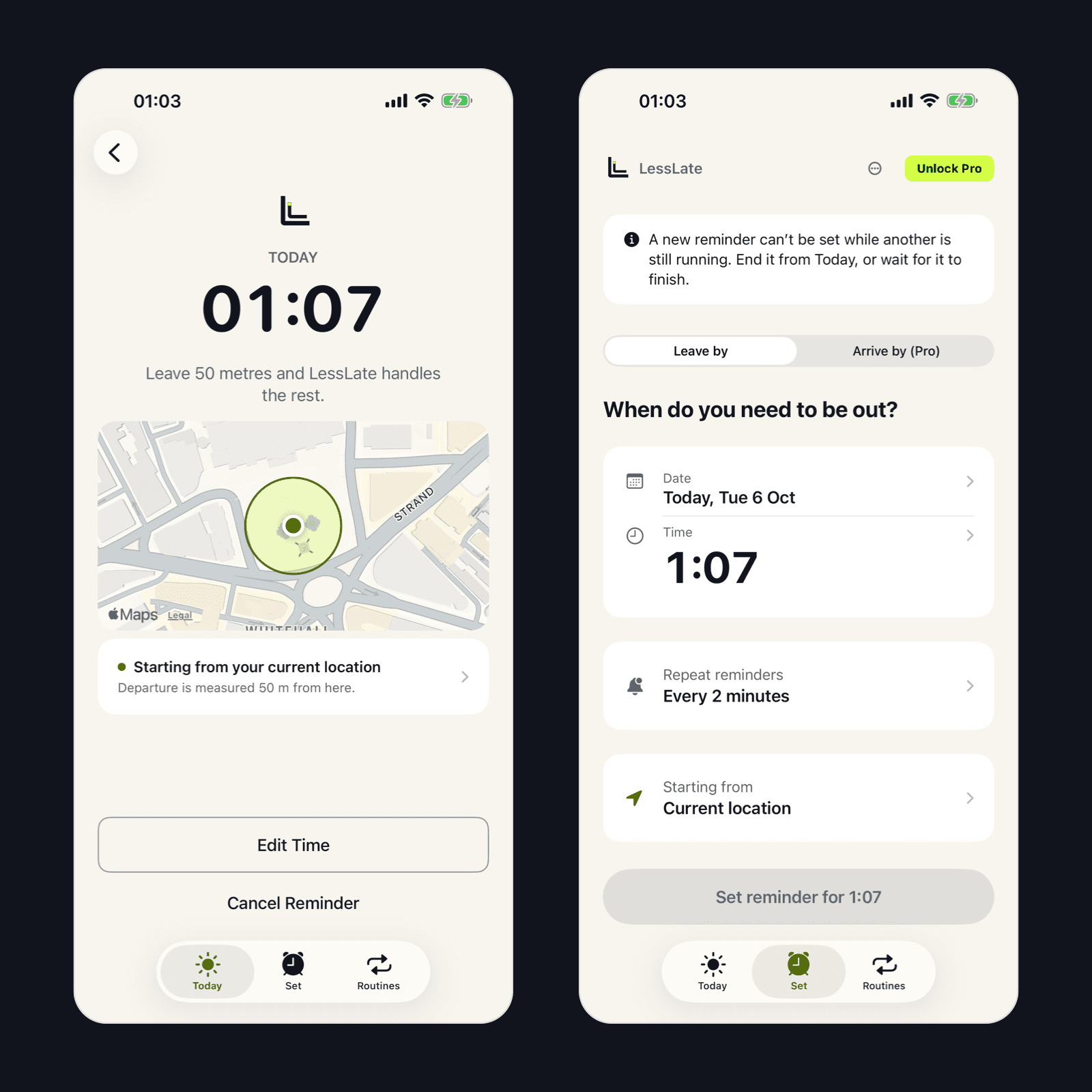
Left: an armed reminder with its leave time and starting area. Right: the Set screen explains why another manual reminder cannot be set.
Evolution
Simpler setup, then automatic routines
Setup got simpler too. A two screen onboarding was built, reviewed and removed in favour of asking for each permission when it is needed. In the 1.2 TestFlight build, three “Pressure” cards became one “Repeat reminders” row, the main action began to name the exact time being set, and a time that has already passed now disables the action with an explanation. These changes reached the public app in 1.3.0. Their effect on setup completion has not been measured.
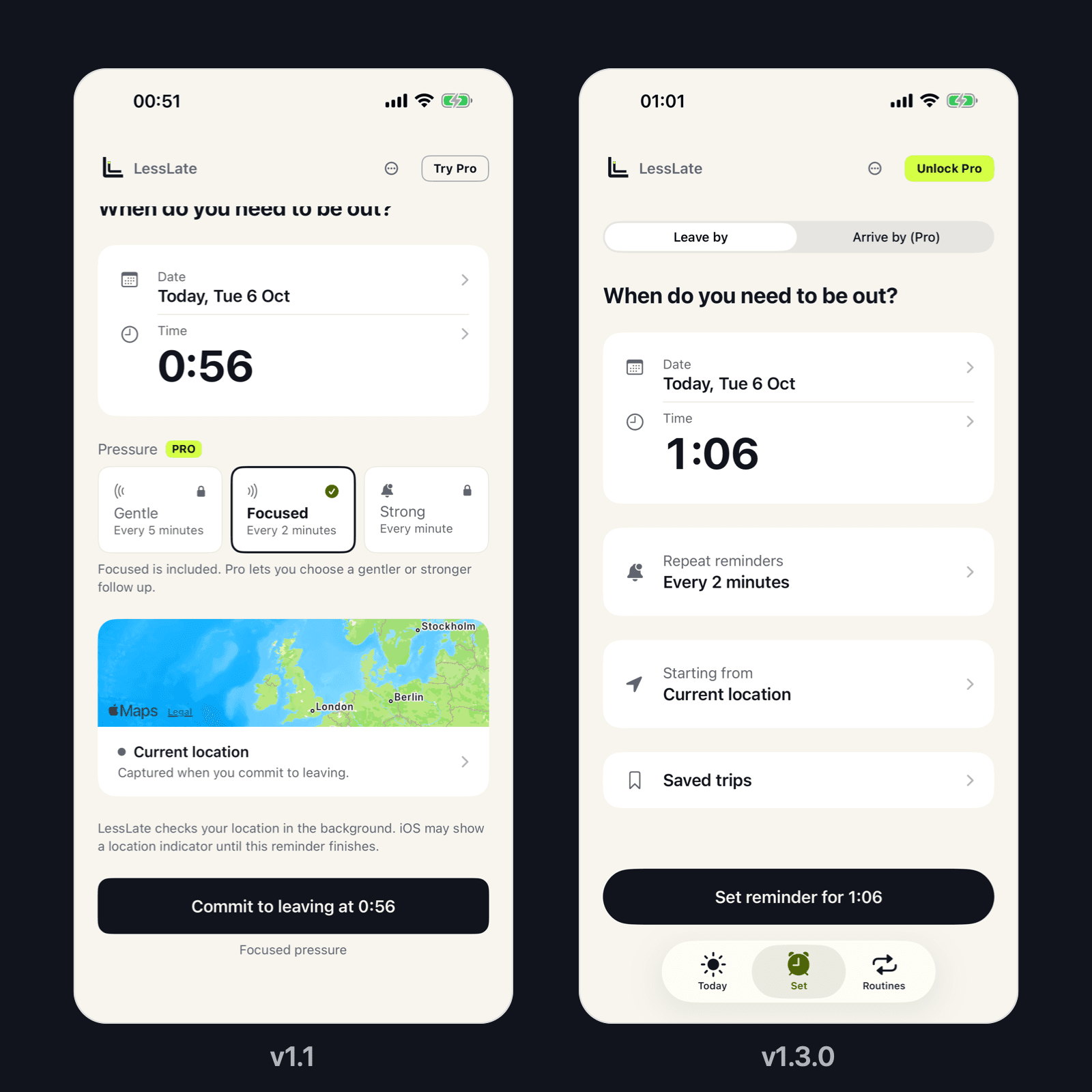
Setup in version 1.1 (left) and the simplified Set screen in version 1.3.0 (right), shown at different scroll positions.
Routines changed direction as well. In 1.1 they were templates applied by hand, because an Arrive by journey has to be measured again each time. Version 1.3.0 added weekly Leave by routines that ring on selected days, with Today as the place to see what is scheduled and in progress.
Product today
Set, Today and Routines
Version 1.3.0 organises the app into three tabs:
Set: choose a leave time. Arrive by planning adds a destination and an arrival time.
Today: see reminders that are scheduled, in progress or recorded earlier that day.
Routines: choose days and a time for regular Leave by reminders.
Once a reminder is armed, the app shows the leave time and starting area, keeps checking after the alarm stops and repeats reminders until departure is confirmed or the person cancels.
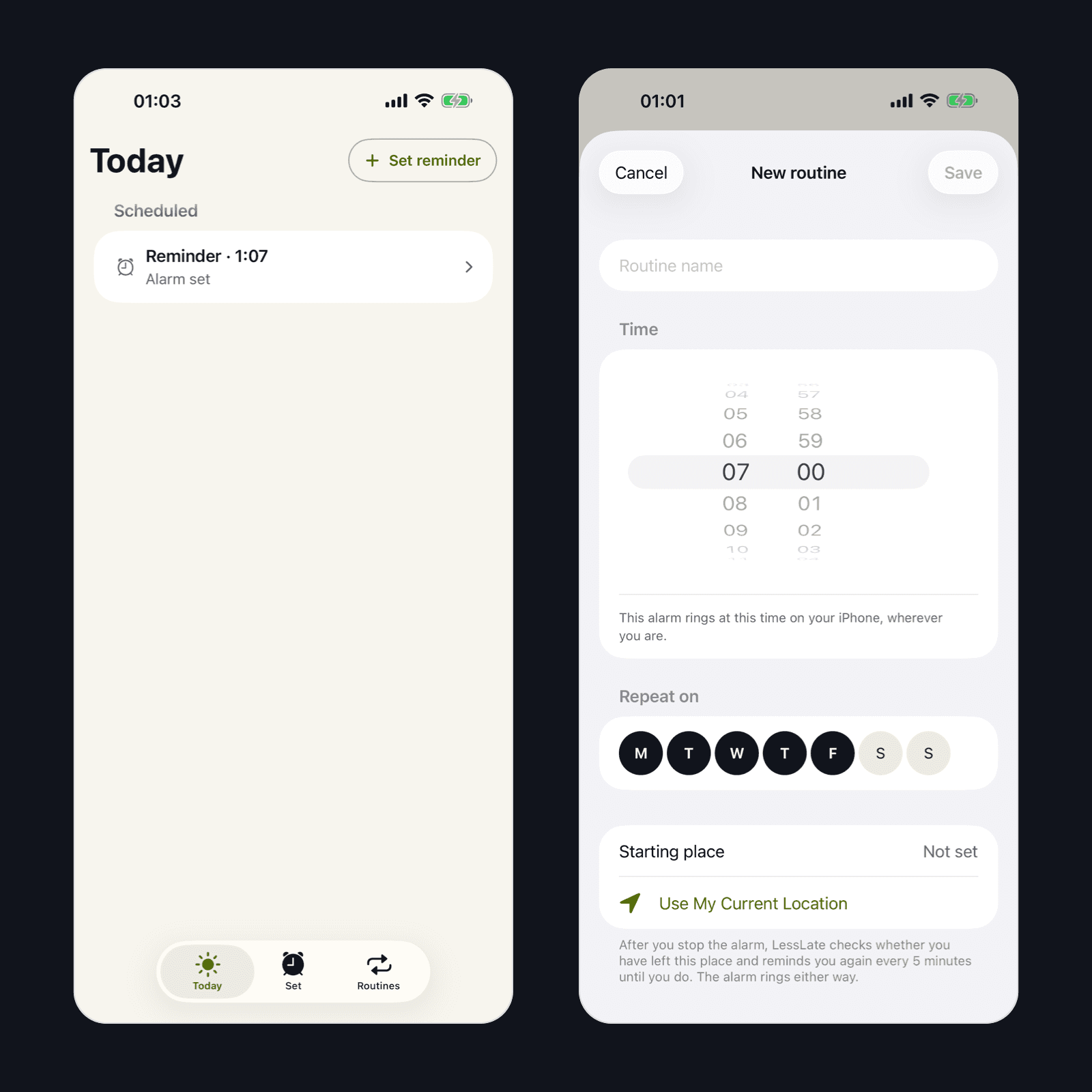
Today with one scheduled reminder (left) and weekly routine configuration (right).
Learning
What I have learned and what comes next
The main lesson was to keep tested behaviour separate from wider outcomes. Device tests on my iPhone, including background departure detection and several routines running at once, show the app working in specific conditions. They do not yet show whether people want it or keep using it.
How I run the product
The project log records decisions, failed checks and accepted device tests with their dates. For failures, it keeps what was observed separate from what was suspected.
What comes next
The next step is testing with a wider group of people. One early tester questioned whether a subscription was worth it and suggested a more tangible reward for leaving on time. Pricing, rewards and first use guidance are under consideration, not shipped.
The journal below records each release as the work continues.
Product Journal
Milestones from the Product Journal, newest first.
·
Version 1.3.0
LessLate 1.3.0: Today and weekly routines
Weekly Leave by routines and a Today tab changed how people set up regular journeys and see what is happening.
·
Version 1.2.0
LessLate 1.2.0: simplifying setup in TestFlight
A TestFlight iteration simplified repeat reminder controls, made the action explicit, and added checks for time and destination selection.
·
Version 1.1
LessLate 1.1: the first public release
The first public release brought the alarm and departure loop to the App Store, with arrival planning, saved trip templates and a Lock Screen display.


